FreePrints Photo Art
- 4.8
- Rating
- 500.00K
- Installs
- Free
- Price

 Analysis by App-foxy
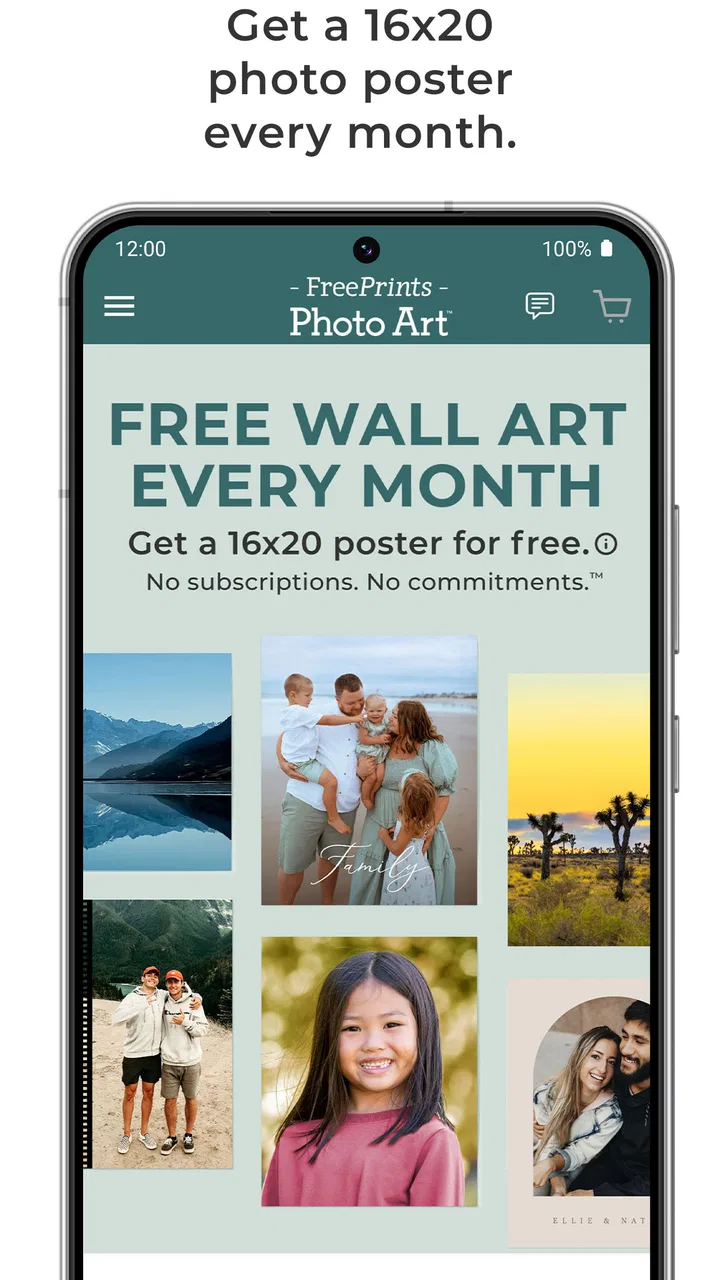
I approached FreePrints Photo Art as a simple way to turn a favorite image into something I could actually put on a wall, rather than leaving it buried in my camera roll. The central appeal is easy to understand: PlanetArt’s photography app lets me claim a free photo poster each month, with no subscription attached. That single capability shapes the whole experience, because the app is less about editing photos endlessly and more about choosing one image that deserves a physical place in the home.
That focus makes it different from a typical photo editor. I would not open it when I want filters, retouching tools, collages, or social-media templates. I would open it when I already have a picture in mind and want to explore whether it works as wall art. In my experience, that narrower purpose is both its biggest strength and its main limitation. It keeps the decision uncomplicated, but it also means people looking for a full creative studio will find the experience intentionally limited.
Turning one personal photo into wall art
The most important thing to understand is that the monthly poster is not just a promotional detail; it is the reason to keep the app installed. Instead of treating printing as a large, occasional project, I can use the app as a small monthly ritual. A family snapshot, a travel scene, a child’s drawing photographed with a phone, or a quiet landscape can become the month’s candidate. The value comes from making that choice regularly without committing to a recurring plan.
You May Also Like

 Blood Strike: 2.5 Anniversary
Blood Strike’s Loadouts Turn Every Drop Into a Tactical Gamble
A close look at Blood Strike’s custom loadouts: how fast access to signature weapons reshapes its battle royale rhythm, rewards preparation, and narrows the gap between fights.

 Pandora - Music & Podcasts
Pandora’s Music Is Easy to Start, but Harder to Recover
Pandora’s strength is its low-effort path from a seed to a station. Its weak spot is how much confidence it asks you to place in connection, setup, and quiet recovery.

 8 Ball Pool
 Is Built on Rivalries, Rematches, and Routine
A close look at the rivalries, rematches, shared routines, and unanswered safety questions that turn a quick pool match into a persistent mobile community.

 Samsung Music
’s Quiet Strength Is Playing What You Already Own
Its reach comes less from spectacle than from dependable access to a personal library. That simplicity is both the app’s strongest retention engine and its ceiling.

 AccuWeather: Weather Radar
AccuWeather Review: A Quick, Clear Forecast for Everyday Decisions
For everyday plans, the best forecast is the one you can understand quickly. AccuWeather makes rain timing, radar, and local conditions easy to act on, with a few trade-offs.

 Hill Climb Racing
Why Hill Climb Racing Still Turns Crashes Into One More Run
A tiny car, a bumpy hill and one more upgrade: Hill Climb Racing keeps resurfacing because its simple chaos makes every near-miss feel personal.
More From Our News Desk
View All News


I like that this encourages a different relationship with my photo library. When photos stay digital, I often take them and forget them. A wall-art option gives me a reason to revisit older images and ask whether one still feels meaningful. The strongest results are not necessarily the most technically perfect photographs. A candid moment with clear emotion can work better than a polished image that has no personal connection.
The app is free to download, and its content rating is Everyone, so it is approachable for households that want a straightforward photography service rather than a complicated design tool. It runs on operating systems from version 10 onward. On the app side, the current release is 2.10.1, which is useful context if someone is checking compatibility before installing.
Its popularity also suggests that the concept is easy for people to understand: it has passed 500 thousand installs and holds a 4.8 average from about 5.4 thousand ratings. I would not treat those figures as a guarantee that every order will suit every person, but they do show that the basic idea has found an audience. The app was released on November 1, 2024, so it still feels like a relatively focused product rather than a mature platform overloaded with unrelated tools.
What the monthly offer changes in everyday use
A free monthly print sounds simple, but it changes how I judge a photo. If I were paying for a large batch, I might wait until I had a major event or a carefully prepared collection. With this app, I can choose one image at a time. That lowers the emotional and financial barrier to experimenting. I can try a portrait one month and a landscape the next without turning the process into a major purchase.
There is also a practical benefit for people who dislike subscriptions. The store summary makes clear that the offer does not require one. That matters because many photo-printing services try to draw users into recurring plans or bundles. Here, the central proposition is easier to understand: return when you want a monthly poster, rather than signing up for an ongoing membership just to access the service.
Still, “free” should not make me careless about the final order. I would inspect the image closely before selecting it. A phone photo that looks sharp on a small screen may reveal softness when enlarged. I would also check the edges for accidental cropping and make sure important faces, text, or objects are not too close to the borders. These are habits worth following with any poster service, but they matter especially when the app’s appeal encourages quick, low-pressure choices.
My best tip is to create a small shortlist before opening the ordering flow. I would choose three or four candidates from different parts of my library, then compare them for subject placement, lighting, and emotional value. This prevents me from picking the first recent image I see. It also turns the app into a useful monthly review of my photographs instead of a rushed transaction.
How I would prepare an image before ordering
I would do the visual preparation before committing to the poster. If an image is very dark, I would brighten it modestly on the phone first. If the subject is surrounded by distracting empty space, I would consider making a separate crop rather than relying on a last-second adjustment. The goal is not to over-edit. Wall art usually benefits from a clear subject and a composition that can survive being viewed from a distance.
For portraits, I would leave breathing room around heads and shoulders. A tightly framed phone portrait may look attractive in the camera app but become awkward if the poster layout trims the sides. For landscapes, I would look for a strong horizon and avoid images where the main point of interest sits at an extreme edge. For photographs containing signs or handwriting, I would be particularly careful, because enlargement can make small imperfections more obvious.
One less obvious use is preserving temporary artwork. If a child creates a drawing, I can photograph it in even light and use that image as a poster candidate. The result is not the same as scanning or professionally reproducing the original, but it gives the artwork a physical presence without asking the child to part with the original. The same approach can work for a handwritten recipe, a small craft project, or a meaningful note.
I would also use it for rotating seasonal decoration. Rather than buying a permanent print for every occasion, I could choose a winter scene, a summer trip photograph, or a birthday memory and change the wall display gradually. The monthly rhythm suits this better than a one-time print order, especially for someone who enjoys refreshing a room without making a large decorating commitment.
A realistic family scenario
Imagine a family returning from a weekend trip with hundreds of phone photos. Most will remain digital, but one picture captures everyone looking relaxed rather than posed. I would open the app, compare that image with a few alternatives, and choose the one with the clearest expressions and enough space around the group. Before ordering, I would inspect the crop carefully, because a group photo can lose a person at the edge more easily than a single-subject image.
When the poster arrives, it could become a small piece of the home rather than another file in cloud storage. The next month, the family might choose a photograph of a local walk, a pet, or a child’s school event. The app works well in this scenario because it gives the family a reason to select one memory instead of trying to print everything. The limitation is equally clear: if the family wants a coordinated gallery wall with several matching sizes and designs, this focused monthly approach may feel too narrow.
For a student or renter, the appeal is different. A favorite city photograph or a personal illustration can make a temporary room feel more individual. Because the app is free, it is easier to try the idea without first deciding that wall decoration deserves a serious budget. I would still recommend choosing images that have strong contrast and a simple focal point, since those qualities tend to remain readable when viewed across a room.
Where the experience may require patience
The no-subscription model is attractive, but it does not remove every possible source of friction. The app’s promise is centered on a poster, so I would not expect the breadth of a professional printing studio. Someone who wants multiple paper choices, extensive framing options, detailed color management, or a large catalog of coordinated products should compare it with a more specialized print service.
This is also not the right tool for photographers who need precise control over the finished reproduction. If I were preparing a portfolio image, selling prints, or producing a carefully color-matched exhibition piece, I would choose a service designed around professional output and proofing. FreePrints Photo Art is better suited to personal memories and casual home decoration, where the emotional value of the image matters more than laboratory-level control.
Another trade-off is the monthly cadence. It is generous for someone who wants one meaningful poster at a time, but inconvenient for a user who has an immediate project involving many photographs. A birthday display, a wedding collection, or a move into a new home may call for several prints at once. In that situation, a conventional photo-printing app with bulk ordering could be a better match, even if its pricing structure is less appealing.
I would also avoid assuming that every photo is automatically poster-ready. The app can make the ordering step feel easy, but it cannot change the basic quality of the source image. A blurry night photograph, a screenshot, or a heavily compressed image may still produce a disappointing result. My practical rule is simple: zoom in on the important details before choosing, and favor a well-lit original over an image that has passed through several messaging apps.
How it compares with ordinary photo apps
Compared with a standard gallery app, this service adds a physical purpose. A gallery helps me store and organize memories; this app encourages me to select one and display it. Compared with an editor, it removes most of the temptation to keep adjusting an image forever. That is useful if I already know what I want, but frustrating if the creative process itself is what I enjoy.
Compared with a general photo-printing service, the strongest difference is the low-commitment monthly model. I do not need to plan a large order to justify opening it. The weakness is that the same simplicity may not satisfy users who want a broad menu of formats and finishing choices. I see it as a companion to a regular photo app, not a complete replacement for every printing need.
PlanetArt’s role is worth noting because the developer is associated here with a product that keeps the path from phone image to wall display relatively direct. I found that focus more useful than a crowded interface would have been. The trade-off is that the app’s usefulness depends heavily on whether I actually want a poster. If I only want to edit, share, or archive photos, I would choose a different category of app.
Who gets the most from it
I think the best audience is someone who has many personal photographs but rarely prints them. Parents, grandparents, travelers, renters, students, and people decorating a first home can all find a natural use for the monthly format. It is also appealing to anyone who wants a physical reminder of ordinary moments rather than only major celebrations.
It can be especially helpful for people who feel overwhelmed by large print orders. Choosing one image is a manageable decision. The monthly limit, viewed positively, creates a gentle boundary: I do not have to sort the entire camera roll or design a complete wall arrangement. I only need to find one photograph that deserves attention now.
I would recommend skipping it if the main goal is professional photography output, extensive customization, or immediate multi-print production. I would also skip it if I rarely want physical decoration at all. A free offer is not automatically useful when the product itself does not fit the person’s habits. The app makes the most sense when the idea of a rotating personal poster sounds enjoyable, not merely when the word “free” catches the eye.
My final take after using the concept as intended
FreePrints Photo Art succeeds because it gives one clear reason to return: select a photograph and give it a life outside the phone. I appreciate that the offer is free and does not depend on a subscription, but I value the decision-making simplicity even more. It turns printing into a small, repeatable habit instead of a project that I keep postponing.
The experience is not designed to replace a full photo editor or a professional print lab, and that is important to accept before installing it. Its strengths appear when I want personal, casual wall art with minimal commitment. Its weaknesses appear when I need precise output, many prints at once, or deep design control.
For me, the most convincing reason to try it is the way it gives forgotten images a second chance. I would keep a shortlist of strong photos, check each one for sharpness and safe cropping, and choose the image that will still feel good to see every day. If you want one meaningful photograph to leave your camera roll each month, this is a focused and approachable option.
FAQs for FreePrints Photo Art
01What is FreePrints Photo Art and how does it work?
FreePrints Photo Art is an app designed to transform your digital photos into high-quality prints and artwork. Users can select images from their device, choose a variety of print sizes and formats, and have them delivered directly to their door. The app offers an easy-to-navigate interface that simplifies the selection and ordering process.
02Is FreePrints Photo Art free to use?
The app itself is free to download and use. FreePrints Photo Art provides a number of free prints each month, with users only needing to pay for shipping and handling. Additional prints, specialty items, or expedited shipping may incur extra charges depending on the selection made.
03What types of prints and products can I create with FreePrints Photo Art?
FreePrints Photo Art offers a wide range of products including standard photo prints, canvases, metal prints, and photo books. Users can customize their selection with various sizes and finishes to best suit their preferences. The app also includes options for personalized gifts such as calendars and phone cases.
04How long does it take to receive my order from FreePrints Photo Art?
Delivery times from FreePrints Photo Art typically range from a few days to a week, depending on the shipping option selected. Standard shipping is usually the most economical choice, while expedited options are available for faster delivery. Shipping times may vary based on location and demand.
05Is my personal data and payment information secure with FreePrints Photo Art?
Yes, FreePrints Photo Art takes user security seriously and employs encryption and secure payment gateways to protect your personal data and payment information. The app adheres to privacy standards, ensuring that your information is handled responsibly and only used for processing your orders.
Pros
- Easy-to-use interface for quick navigation.
- High-quality prints with vibrant colors.
- Wide range of art styles available.
- Affordable pricing with frequent discounts.
- Fast delivery service for orders.
Cons
- Limited editing tools within the app.
- Requires internet connection for use.
- Occasional app crashes reported.
- Shipping fees can add up for bulk orders.
- Limited support for non-standard sizes.

FreePrints Photo Art
Gallery